

A marketing operations technology stack is the connected set of platforms a Marketing Ops team uses to capture, route, score and report on demand. Buy only what closes a proven gap, connect tools through shared data standards and clean handoffs, then retire anything duplicated or unused to keep costs and reporting reliable.

For UK B2B marketing operations teams, the technology stack is rarely a buying problem. It is an accumulation problem that a structured audit, CRM-first data design, and a disciplined retirement cycle can resolve.
- Set CRM data flows first: Agree which data belongs in the CRM before buying any additional reporting or attribution tooling.
- Consolidate overlapping licences: Retiring one duplicated tool typically funds the integration work that makes the rest of the stack behave as a single system.
- Map tools to jobs: Every tool needs a named owner, a defined function, and evidence it last moved a measurable metric. Without all three, it is a retirement candidate.
- Connect the integration layer: Middleware or native CRM connectors are what make five tools behave as one system rather than five partial records of the same contact.
- Retire on a review cycle: Quarterly stack reviews prevent silent renewal creep. Each tool should earn its seat with usage data and a named stakeholder who can account for it.
Introduction
Most UK B2B marketing operations teams do not have a technology problem so much as an accumulation problem. A marketing operations technology stack built tool by tool, an automation platform added for one campaign, an attribution tool added for a board report, a reporting layer added because someone asked, rarely gets reviewed as a whole. The result is overlapping licences, unclear ownership, and data that lives in four places while the CRM holds a partial copy.
The conventional fix is to shop by category: spot a gap, buy a product, wire it up. That made sense when every tool had one distinct job. Now marketing automation platforms, attribution tooling and reporting suites overlap heavily, and a mid-market team of twenty to five hundred people often pays for two or three tools doing the same work. Renewals arrive quietly. Nobody owns the decision, so nothing is retired, and integration effort goes on holding the stack together rather than improving what it does.
Floodlight's view is that sequence matters more than the shopping list. Before adding another reporting layer, agree which data belongs in the CRM and which system is the source of truth. Then map each tool to a job, a named owner and a last date it moved a metric. A tool that cannot answer all three is a retirement candidate, and the licence saved usually covers the integration work. The sections below cover how to assess what you own, what should connect, and what should go.
What does a marketing operations technology stack actually contain in a UK mid-market business?
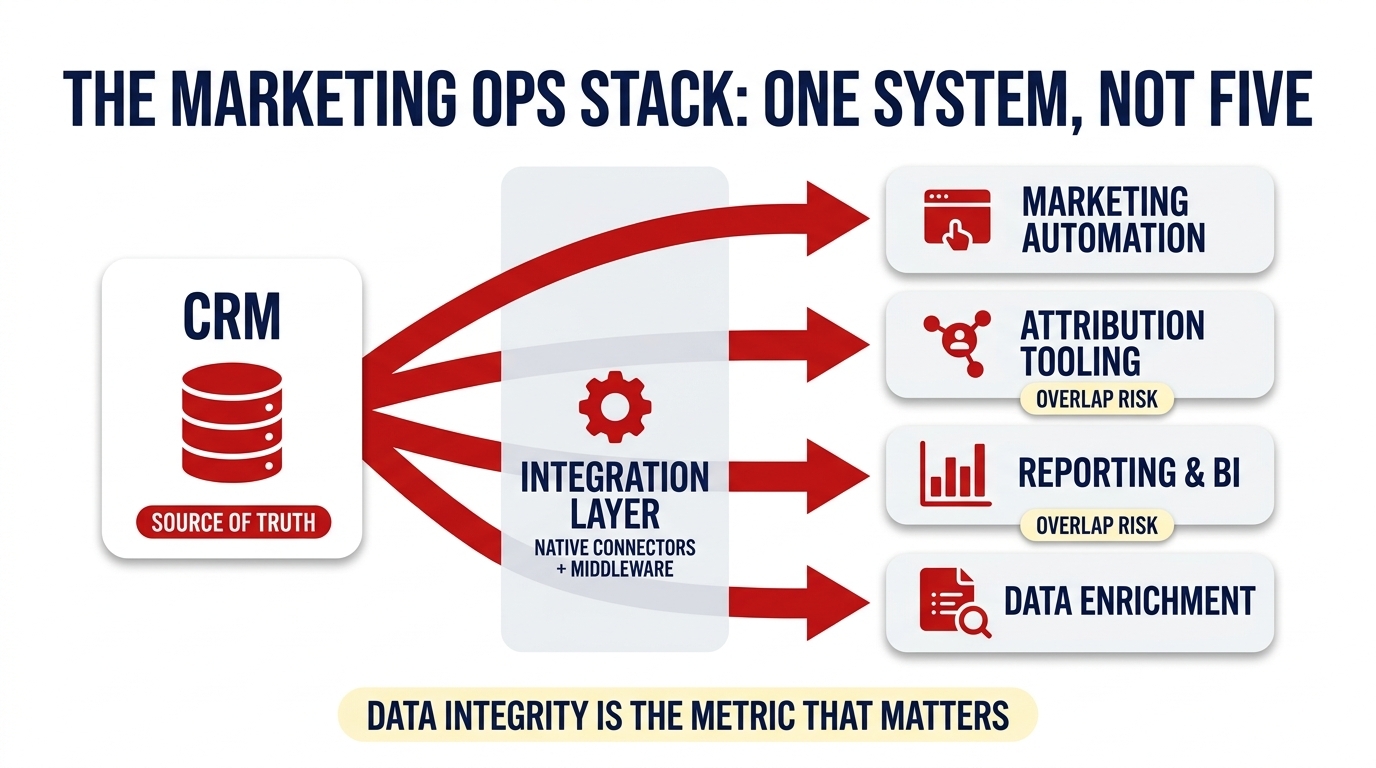
A typical marketing operations technology stack in a 20 to 500 person UK B2B business contains more tool categories than most teams can name from memory: CRM, marketing automation platform, attribution tooling, a reporting or BI layer, data enrichment, and the connective tissue routing data between them. The list is almost always longer than it appears.
Each category serves a distinct function in principle. The CRM holds contact records and pipeline; the automation platform manages nurture sequences and lead scoring; attribution tooling tracks which activity influences revenue; the reporting layer aggregates performance across channels; enrichment tools append firmographic data to improve segmentation. In practice, these categories rarely map to separate tools in a mid-market martech stack. A 60-person SaaS team running HubSpot alongside Pardot, a Google Looker Studio layer, and a point solution for LinkedIn attribution will find that their CRM includes basic email functionality, their automation platform includes dashboards, and their BI layer duplicates reports already available inside the CRM.
That accumulation of overlapping capability is not accidental. It reflects how most marketing operations technology gets acquired.
Why do most marketing ops stacks accumulate rather than grow deliberately?
Building on that pattern of overlap, most marketing ops stacks grow by reaction rather than by design. A tool is bought for a specific campaign, auto-renewed because no named owner flags it for review, and then orphaned when the person who purchased it moves on. This is a structural feature of how UK mid-market B2B organisations budget for marketing ops tooling, not a failure of individual judgement.
Three mechanisms drive accumulation. First, tools are procured for a defined initiative with no exit criteria when the campaign ends, the licence continues. Second, renewals process automatically because ownership is informal and nobody is accountable for the decision to continue. Third, headcount and team changes leave tools without a named owner, which means they are neither assessed nor retired.
The costliest result is overlap between the automation platform and CRM email functionality, or between attribution tools and CRM pipeline reporting. Both pairs perform similar jobs from different data pools, producing inconsistent figures that teams then spend time reconciling. When Floodlight begins working with a new client, the first conversation is almost always about what the stack already contains, what it does, what it duplicates, and what nobody can account for, rather than what to add next.
The discipline that resolves accumulation is a structured audit, applied consistently.
How do you audit what your current stack actually does?
A practical stack audit maps each tool to three things: a named job, a named owner, and a date it last influenced a measurable outcome. Any tool in the marketing operations technology stack that cannot answer all three with evidence is a retirement candidate, regardless of what it cost at purchase or what it was intended to do.
What information should a stack audit document capture?
A stack audit document should record six fields for every tool:
- Tool name: the product and vendor
- Contract renewal date: the date by which a retirement or renewal decision must be made
- Named owner: the individual accountable for the tool's continued use
- Primary function: the specific job the tool performs, in one sentence
- Overlap: any other tool in the stack that performs the same or adjacent function
- Last metric moved: the most recent pipeline or revenue metric the tool demonstrably influenced
If a named owner cannot identify the last pipeline metric the tool influenced, the licence is a retirement candidate. That test is the audit's decision engine.
How often should a marketing ops team review its stack?
A quarterly review cadence is more effective than an annual one. Renewal creep compounds: quarterly licences renew, headcount changes, and tools drift into disuse between annual reviews. Reviewing approximately one-third of the stack each quarter distributes the workload and ensures no tool is ignored for more than twelve months.
The inputs to each review are usage data, logins, active workflows, and CRM records written. A named stakeholder must formally sign off each tool at every review cycle. The owner who can demonstrate that their tool writes usable data back to your CRM integration or equivalent has a clear case for retention; the owner who cannot has a clear case to answer.
The audit answers what exists. The next question is what data should flow into the CRM before anything else is added.
Which data flows should be established in the CRM before buying any additional tooling?
CRM-first data design means deciding which data belongs in the CRM, contact records, lifecycle stage, pipeline contribution, and engagement history, before adding attribution or reporting layers that will duplicate or contradict what is already there. The question most mid-market UK teams skip is not which tool to buy next but which system owns the record.
This is precisely where most marketing ops decisions go wrong. Attribution platforms are purchased before the CRM's source field is consistently populated. Reporting layers are added before lifecycle stage transitions are reliably recorded. The result is a reporting layer built on incomplete CRM data, which produces incomplete reports regardless of how well the layer itself is configured.
The practical flows to establish first are: lead source captured at contact creation, lifecycle stage transitions triggered by defined criteria, campaign attribution mapped to pipeline, and engagement scoring written back to contact records. Each must be in the CRM before a reporting layer can use it meaningfully.
Floodlight's CRM configuration work starts with a single question: which data belongs in the CRM and which system is the source of truth for each field? That question determines the integration architecture, not the other way around. According to Gartner, poor data quality costs organisations at least $12.9 million per year. For a mid-market team, the consequence is proportionally smaller but structurally identical: reporting built on bad data produces decisions built on bad data.
With data flows established, the next area to examine is where the stack itself generates unnecessary cost through overlapping tool functions.
Where does overlapping functionality create the most unnecessary cost in a marketing ops stack?
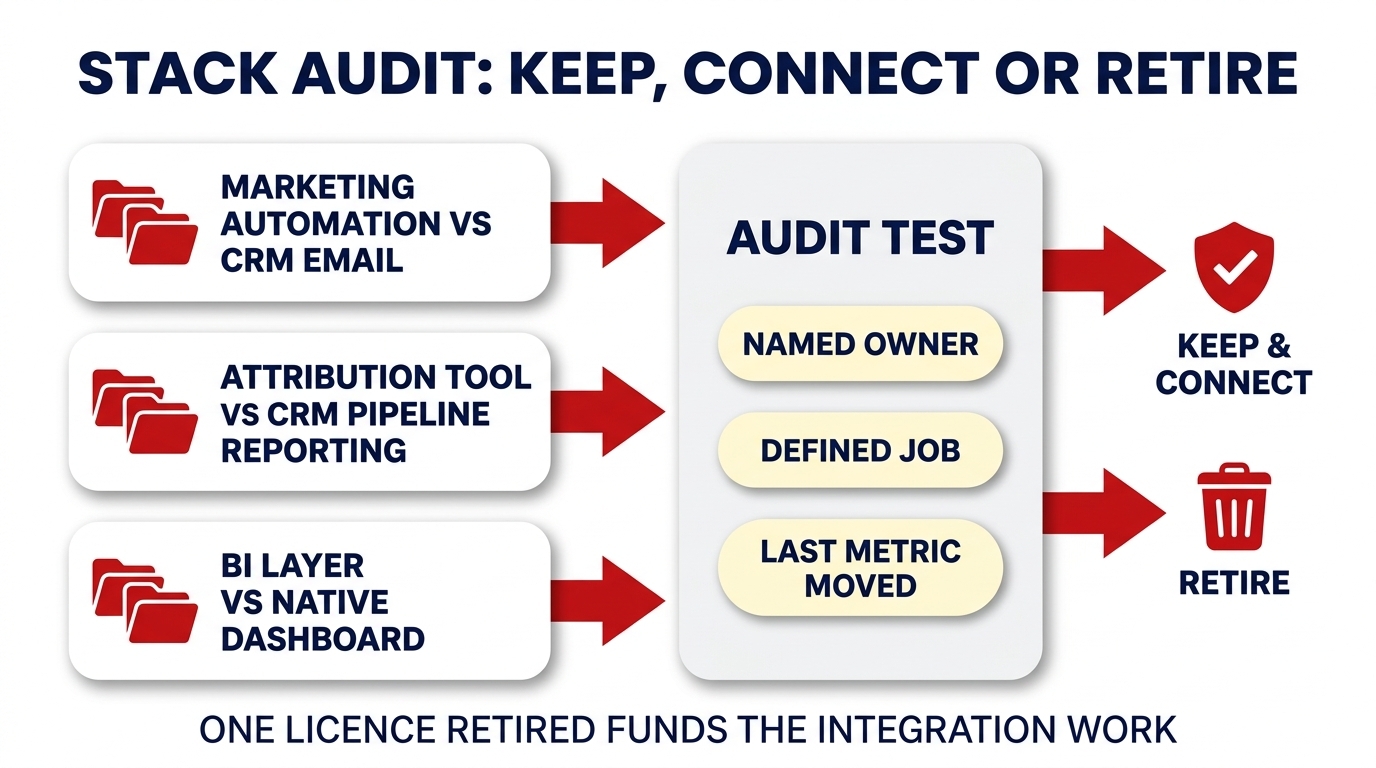
The three most common overlap zones in a martech stack are: marketing automation and CRM email, attribution tooling and CRM pipeline reporting, and BI or analytics layers duplicating platform-native dashboards. Each overlap represents a licence paid for work the adjacent tool already does, often less accurately, because the data is split.
Marketing automation versus CRM email is the most frequent duplication. Both tools send sequences, both track opens and clicks, and neither holds the complete engagement picture because each writes to a separate data store. The result is two partial records of the same contact's behaviour.
Attribution tooling versus CRM pipeline reporting is the costliest to reconcile. CRM closed-loop reporting already attributes revenue to source when configured correctly. A separate attribution platform is only justified when multi-touch modelling adds something the CRM cannot produce natively, which, for most mid-market B2B teams, it does not.
BI layers versus platform-native dashboards is the commonest source of passive licence waste. HubSpot and Salesforce native reporting covers most mid-market requirements. A separate BI layer is warranted only when genuine cross-platform data consolidation is required, not when teams simply find the native interface unfamiliar.
The consolidation principle is straightforward: retiring one overlapping licence funds the integration work that makes the remaining tools behave as a single system. That investment compounds, because according to McKinsey (2021), personalisation most often drives a 10 to 15% revenue lift, an outcome that requires clean, unified data, not more tools producing conflicting signals.
Buying tools before mapping the process they need to support
What happens: Marketing ops teams adopt platforms to solve an immediate pain point without checking integration compatibility or retiring redundant tools. The result is a bloated stack with overlapping functions, poor data quality, and rising licence costs that nobody has authority to address.
What to do instead: Map the process the tool needs to support before procurement. Confirm it integrates with your CRM natively, check which existing tool it overlaps with, and set an exit criterion in advance so the licence does not auto-renew once the use case has passed.
How should a mid-market UK team evaluate a marketing automation platform against its CRM?
The primary evaluation criterion for a marketing automation platform is whether it syncs bidirectionally with the CRM, with contact records, lifecycle stages, and engagement data flowing both ways, and whether its reporting connects to pipeline rather than stopping at email metrics. A platform that only reports opens and clicks adds a data silo, not a capability.
Four criteria should guide the evaluation. First, native CRM sync: does contact, company, and deal data update in both systems without middleware? Second, lead scoring configuration: can scores be built from CRM-held firmographic and behavioural data, or only from platform engagement? A score built only on email opens will misrepresent intent. Third, segmentation: can the platform segment by CRM deal stage, industry, or custom properties? Without that, campaigns cannot be targeted to pipeline position. Fourth, reporting: does campaign reporting connect to revenue, or only to activity metrics?
Platforms marketed as all-in-one solutions require particular scrutiny. The evaluation question is whether their CRM module is strong enough to retire a separate CRM licence or whether it introduces another partial data store. Floodlight's lead scoring and routing configuration work consistently shows that faster lead qualification and reclaimed marketer time follow from properly configured scoring and governance, not from adding another automation layer. According to HubSpot's State of Marketing, about a third of marketers say AI saves their team 10 to 14 hours per week, a figure only realisable when automation is connected to clean CRM data, not running alongside it.
The mechanism that makes that connection possible is the integration layer itself.
What is the integration layer and why does it determine whether the stack behaves as one system?
The integration layer, whether native CRM connectors or middleware such as n8n or Make, is the mechanism that routes data between tools without manual export or reconciliation. Without it, five tools in a marketing operations technology stack produce five partial views of the same contact record, and the CRM never becomes a genuine source of truth.
When is native CRM integration sufficient and when is middleware needed?
Native integration handles standard object sync between a CRM and a single connected platform, with contacts, companies, and deal records updating in both systems when a field changes. For a straightforward CRM-to-automation-platform connection where lifecycle stages and contact properties are the primary data objects, native connectors are sufficient and simpler to maintain.
Middleware such as n8n or Make is required when workflows are multi-step, conditional, or cross-platform. A practical example: a form submission on a website should update a contact's lifecycle stage in the CRM, trigger a sequence in the automation platform, and notify the relevant sales owner based on firmographic criteria held in the CRM. No native connector handles that chain. Middleware does.
The integration layer is what makes stack consolidation safe. Retiring a tool is only viable when the data flows it managed are mapped and maintained elsewhere. Otherwise retirement creates gaps that appear only after the licence has lapsed. The right marketing ops tooling outcome, once the integration layer is correctly configured, is faster lead qualification and reclaimed marketer time. That is the result of connected systems, not additional ones.
Conclusion
A marketing operations technology stack that accumulates tools without a structured audit, defined data ownership, or a functioning integration layer will keep producing the same problem: five systems, five partial records, and reporting that nobody fully trusts. For UK mid-market B2B teams, the cost is not abstract. It sits in reconciliation time, misattributed pipeline, and licences renewing for tools nobody can account for.
The discipline this article describes, audit what exists, establish CRM-first data flows, retire what overlaps, connect what remains, produces a stack that behaves as a single system rather than a collection of competing ones. Cleaner data supports better lead qualification, more reliable attribution, and marketing decisions grounded in what actually happened.
Frequently Asked Questions
What is a marketing operations technology stack?
A marketing operations technology stack is the organised set of software tools a business uses to plan, execute, measure and automate its marketing activity. For Marketing Ops teams, it typically spans CRM, automation platforms, analytics, and data management tools, all working together to support consistent, measurable marketing performance across the business.
How does a marketing operations technology stack work for Marketing Ops businesses?
Each tool in the stack handles a specific function, CRM manages contacts, automation runs campaigns, analytics reports results. Integration is what makes the stack work: data flows between platforms so Marketing Ops teams avoid manual exports, duplicate records, and reporting blind spots. A well-connected stack behaves like a single system rather than isolated tools.
What are the main benefits of a marketing operations technology stack for Marketing Ops companies?
A well-built marketing operations technology stack reduces manual work, improves data accuracy, and shortens campaign execution times. Marketing Ops teams gain clearer visibility over pipeline contribution, can attribute revenue to specific activities, and spend less time firefighting system errors, freeing capacity for strategic work that directly influences commercial outcomes.
How long does a marketing operations technology stack take to implement?
A realistic full-stack implementation takes three to nine months, depending on the number of platforms, data complexity, and team capacity. A phased approach, CRM first, then automation, then analytics, reduces risk. Rushing integration to meet an arbitrary deadline is the most common reason stacks fail to deliver consistent, reliable data.
Marketing operations technology stack vs all-in-one marketing suite, what is the key difference?
A marketing operations technology stack connects best-fit tools chosen for specific functions, whereas an all-in-one suite bundles everything inside a single vendor's platform. Stacks offer greater flexibility and specialist capability but require integration management. Suites reduce complexity but can limit what Marketing Ops teams can do as requirements grow more sophisticated.
Is a marketing operations technology stack right for Marketing Ops teams managing multiple campaign channels?
Yes, provided the team has someone responsible for stack governance. If your Marketing Ops function runs email, paid, content and CRM activity simultaneously, a structured technology stack prevents data fragmentation. Without clear ownership of integrations and data standards, multi-channel teams accumulate tool sprawl that costs more to maintain than it delivers in output.
What is the most common mistake Marketing Ops companies make with a marketing operations technology stack?
The most common mistake is buying tools before mapping the process they need to support. Marketing Ops teams often adopt platforms to solve an immediate pain point, without checking integration compatibility or retiring redundant tools. The result is a bloated stack with overlapping functions, poor data quality, and rising licence costs that nobody has authority to address.
If you are weighing up who should own this stack, read what a marketing operations manager actually owns. What metric should I track to measure marketing operations technology stack success?
Track data integrity rate, the percentage of contact and deal records that are complete, correctly formatted, and free from duplicates across your stack. Set your own baseline before you set a target, because the number that matters is whether it is improving. Poor data integrity is the earliest indicator that integrations are failing and that downstream reporting can no longer be trusted.
Final word: audit first, then connect what remains
Before buying any new tool, map what you already own against a named job, a named owner, and a last metric moved. Retire what overlaps, establish CRM-first data flows, and let the integration layer do the work of connecting the rest.
Book a discovery call